
メールを専用アドレスで受信Receive at your dedicated address
発行された @mailSpeak.jp アドレスへ直接送信するか、Gmail・Outlookなどから必要なメールを転送します。Send directly to your @mailSpeak.jp address or forward selected messages from Gmail, Outlook, and other services.
同じサービスを、Alexaスキル中心とアプリ中心の2つの視点で紹介しています。The same service, explained from two angles: the Alexa skill and the apps.
Amazon Alexaがメールを声で読み上げるしくみと、mailSpeak全体像(AI・アプリ・Web)を紹介します。How Amazon Alexa reads your email aloud, plus an overview of the whole mailSpeak service (AI, apps, and Web).
このまま読み進めるContinue on this page アプリ紹介ページApp guide page Android・Windowsアプリを中心に知りたいFocus on the Android & Windows appsWindows PC版・Android版アプリの機能、通知のAI整理・要約、画面の使い方を詳しく紹介します。A detailed look at the Windows PC and Android apps: features, AI-organized notifications and summaries, and how to use each screen.
アプリ紹介ページへ移動Go to the app guideAlexaスキルから始まった mailSpeakmailSpeak began as an Alexa skill
NEW新機能紹介What's newスマート通知共有サービス「mailSpeak」(メールスピーク)は、受信メールをAmazon Alexaがハンズフリーで読み上げるAlexaスキルから始まりました。その使いやすさを核に、AIによる選別・要約、Android通知、Windows PC、Webへ機能を広げています。The smart notification sharing service mailSpeak began as an Alexa skill that reads incoming email aloud hands-free. Building on that core experience, it now adds AI filtering and summaries, Android notifications, a Windows PC app, and Web management.
Alexaの音声通知を中心に、AI・アプリ・Webがひとつにつながります。Alexa voice alerts remain at the center while AI, apps, and Web work together.
The Original Alexa Experience
専用のmailSpeakアドレスへ届いたメールを選別し、Amazon Echoが声でお知らせします。スマホを持ち歩かなくても、家事、仕事、介護などで手が離せない時に大切な連絡へ気づけます。Email arriving at your dedicated mailSpeak address is filtered and announced by Amazon Echo. You can catch important messages while working, doing housework, or caregiving without carrying your phone.
発行された @mailSpeak.jp アドレスへ直接送信するか、Gmail・Outlookなどから必要なメールを転送します。Send directly to your @mailSpeak.jp address or forward selected messages from Gmail, Outlook, and other services.
差出人、件名、本文などのフィルターに加え、ChatGPT・Gemini・Claudeによる重要度判定や要約も利用できます。Use sender, subject, and body filters, plus importance checks and summaries powered by ChatGPT, Gemini, or Claude.
「メールスピーク」と「スマセンサー」をAlexa定型アクションで連携。Echo Showでは画像や一部資料の表示にも対応します。Connect mailSpeak and SmaSensor in an Alexa routine. Echo Show can also display images and supported documents.
メール受信から読み上げまでを自動化。必要に応じてAI分析を途中に加えられます。Automate the path from email arrival to read-aloud, with optional AI analysis in the middle.
One Platform, Every Device
Alexaのメール読み上げを中心に、Androidアプリの通知収集、Windows PCのデスクトップ通知、Webのログ・設定管理を追加。同じアカウントで、情報の入口から受け取り方までをつなぎます。Starting with Alexa email read-aloud, mailSpeak now adds Android notification collection, Windows desktop alerts, and Web-based logs and settings—all under one account.
メール、Androidアプリ通知、通話・バッテリー変化、Windowsトースト通知を受け取ります。Receive email, Android app alerts, call and battery events, and Windows toast notifications.
重要度を判定し、要約、タスク抽出、返信案作成などをユーザーの指示に沿って実行します。Judge importance and follow your instructions for summaries, task extraction, and reply suggestions.
PC画面、スマホ通知、Alexaの音声、Webログへ。端末をまたいでリアルタイムに共有できます。Share in real time across PC screens, phone notifications, Alexa voice, and Web logs.
Use Cases
個人から法人まで、「情報の見逃し」と「通知の洪水」を減らし、必要な連絡にすばやく気づける環境をつくります。For individuals and organizations, mailSpeak reduces missed information and notification overload so important messages stand out.
スマホを見ずに重要連絡の要約を確認。See key summaries without checking your phone.
通知、着信、充電状況を1台へ集約。Bring alerts, calls, and battery events together.
手が離せない時はAlexaの声で確認。Listen through Alexa when your hands are busy.
見守り機器のアプリ通知を家族へ共有。Share monitoring-device alerts with family.
株価やニュース速報を声と画面で把握。Catch market and news alerts by voice or screen.
Cloud AI Hub
条件付きフィルターとChatGPT・Gemini・Claudeを組み合わせ、通知、破棄、AI分析、転送などの処理を自動化します。Combine rules with ChatGPT, Gemini, and Claude to automate notification, discard, AI analysis, and forwarding actions.
Alexa Skill + Apps
声で受け取るAlexaを核に、通知を集めるAndroid、PC作業を支えるWindows、履歴と設定を管理するWebが連携します。必要なデバイスだけでも利用できます。Alexa remains the voice-first core, joined by Android for collecting alerts, Windows for desktop work, and Web for logs and settings. Use only the devices you need.
mailSpeak for Windows
Windows版の追加により、スマホを手に取らなくても、PC画面とスピーカーから重要な情報をすばやく確認できるようになりました。With the Windows app, important information is available on your PC screen and speakers without reaching for your phone.
Android版と共通のわかりやすいUIで、通知転送、AI要約、ログ検索、端末管理を行えます。A clear interface shared with Android brings notification forwarding, AI summaries, log search, and device management together.
Plans
無料版は0円で利用でき、プレミアム版へ自動的に切り替わることはありません。 Windows PC版・Android版のダウンロードも無料です。The Free plan costs 0 JPY and never switches to Premium automatically. The Windows and Android apps are also free to download.
Get Started
どちらの始め方でも、無料版0円から利用できます。 メールを声で受け取りたい方はAlexaスキルから、通知共有から始めたい方はAndroid/Windowsアプリから。必要な機能は後から追加できます。Either path starts with the 0 JPY Free plan. Choose Alexa for voice-first email or Android/Windows for notification sharing, then add more features later.
無料版0円から、メールを声で受け取るHear email aloud with the 0 JPY Free plan
無料ダウンロード・無料版0円から利用Free download with a 0 JPY Free plan
Alexa Skill Guide
mailSpeakの中心機能であるAlexa読み上げ、2つのスキルの連携、定型アクション、既存メールの転送、Echo Show表示まで、設定に必要な情報をまとめています。Find everything needed for mailSpeak's core Alexa experience: two-skill linking, routines, forwarding existing email, and Echo Show display.
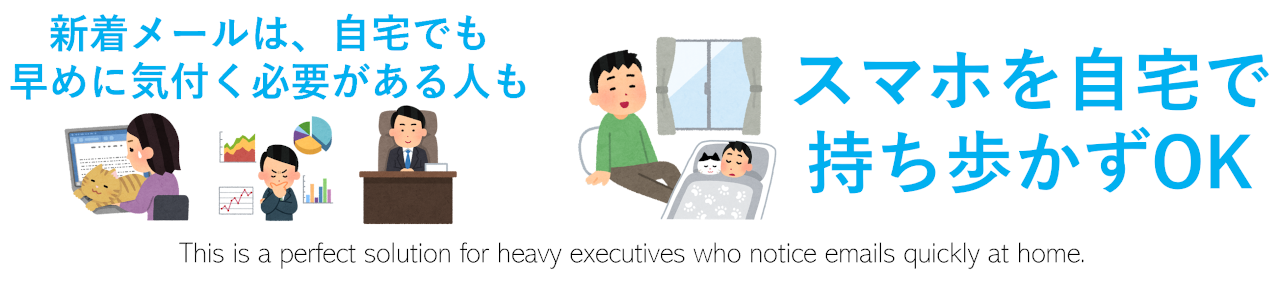
家事や作業中でも、Alexaが新着メールを音声で知らせます。Alexa announces new mail while you work or take care of the home.
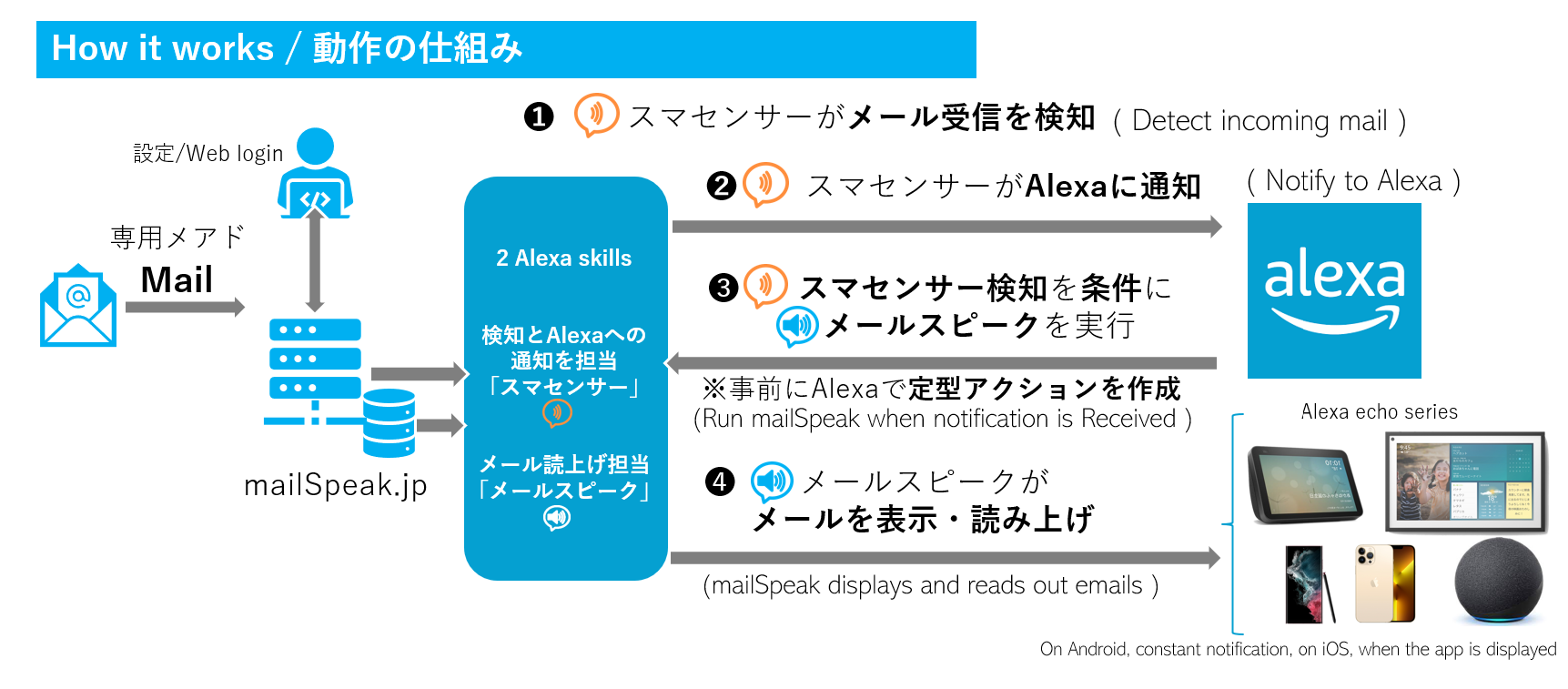
「メールスピーク」と通知用「スマセンサー」を連携して自動読み上げを実現します。Connect mailSpeak and SmaSensor to enable automatic read-aloud.
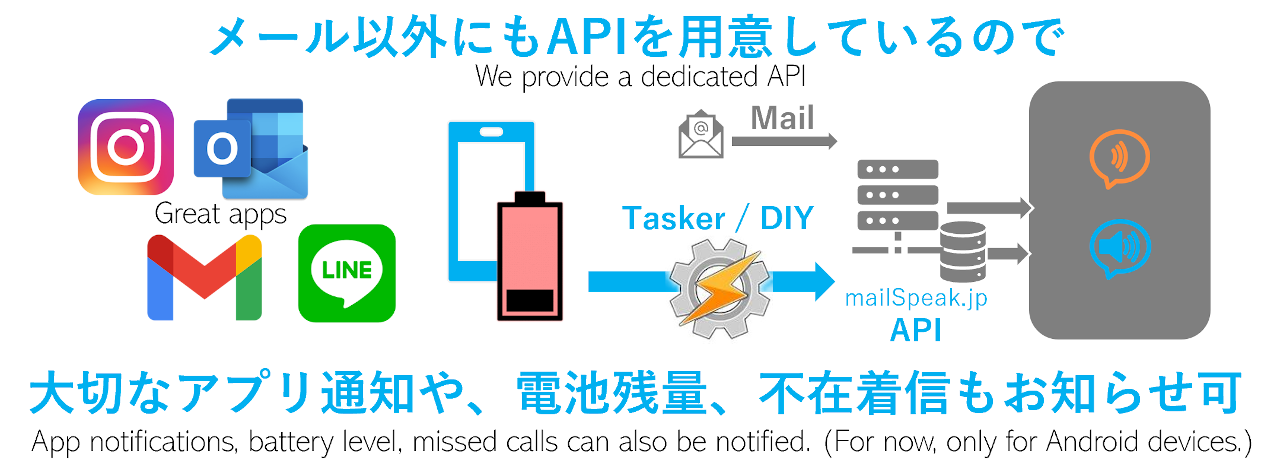
スマホ通知やIoTデバイスからの情報もAlexaや各端末へ届けられます。Deliver smartphone and IoT information to Alexa and other devices.
Alexa定型アクションのサンプルSample Alexa routine / 詳しい操作ガイドDetailed operation guide
Gmailなどへ届くメールを読み上げる場合は、mailSpeak用アドレスへの転送を設定します。確認メールはマイページの「読上メールログ」で確認できます。To read mail from services such as Gmail, forward it to your mailSpeak address. Confirmation messages are available in Read Mail Log on My Page.
プロンプト、通知先、AIモデルなどをマイページから設定できます。画像をタップすると拡大します。Configure prompts, destinations, and AI models from My Page. Tap an image to expand it.
Echo Show Demo
Service Information
FAQ
迷惑メール、ゴミ箱、Gmailのプロモーション/ソーシャルタブ、受信拒否やドメイン指定設定をご確認ください。それでも届かない場合は、メール認証が不要なGoogle IDでのログインもお試しください。Check Spam, Trash, Gmail Promotions/Social, blocked-sender rules, and domain allowlists. You can also try Google sign-in, which does not require email verification.
Googleが送る転送確認メール内のリンクを開かないと転送は有効になりません。mailSpeakのマイページにある「読上メールログ」で確認メールを探してください。複数のGoogleアカウントを使っている場合は、転送元と同じアカウントでリンクを開いてください。Forwarding stays disabled until you open Google's confirmation link. Find the message in Read Mail Log on mailSpeak My Page, and if you use multiple Google accounts, open it with the same account that owns the forwarding settings.
はい。AlexaスキルがmailSpeakの基本機能で、メールの受信・読み上げはAlexaだけでも利用できます。Android版・Windows版・Webダッシュボードは、通知の共有や確認、AI設定などを広げたい場合に追加できます。Yes. The Alexa skill is the core of mailSpeak, and you can receive and hear email with Alexa alone. Add Android, Windows, or the Web dashboard when you want more notification sharing, review, or AI controls.
無料版は0円です。プレミアム版は年額2,480円で、1か月の無料お試しがあります。Windows PC版・Android版のダウンロードはいずれも無料です。自動的に有料プランへ切り替わることはありません。The free plan costs 0 JPY. Premium is 2,480 JPY per year with a one-month free trial. Both Windows and Android apps are free to download, and your account is not automatically switched to a paid plan.
リモートワーク中に、自宅のどこにいても重要なメールを逃さないため、Alexaがメールを読み上げるスキルとして始まりました。IMDは1999年のモバイルWebメール「MoCo」以来のメッセージング開発経験を活かし、Alexaを中心に、メール、通知、AI、Android、Windows、Webをつなぐサービスへ発展させています。It began as an Alexa skill that reads email aloud, helping remote workers avoid missing important messages anywhere at home. Building on IMD's messaging experience since the 1999 mobile webmail MoCo, mailSpeak now connects Alexa with email, notifications, AI, Android, Windows, and the Web.

FAQや操作ガイドで解決しない場合は、Webサポートからお問い合わせください。バグ報告や機能改善のご要望もお待ちしています。If the FAQ and operation guide do not solve your issue, contact Web Support. Bug reports and feature requests are also welcome.
プレミアム版へ自動的に切り替わることはありません。まずは無料版で始め、必要に応じてWindows・Android・Webへ広げられます。There is no automatic upgrade to Premium. Start free, then expand to Windows, Android, and the Web when you need them.